
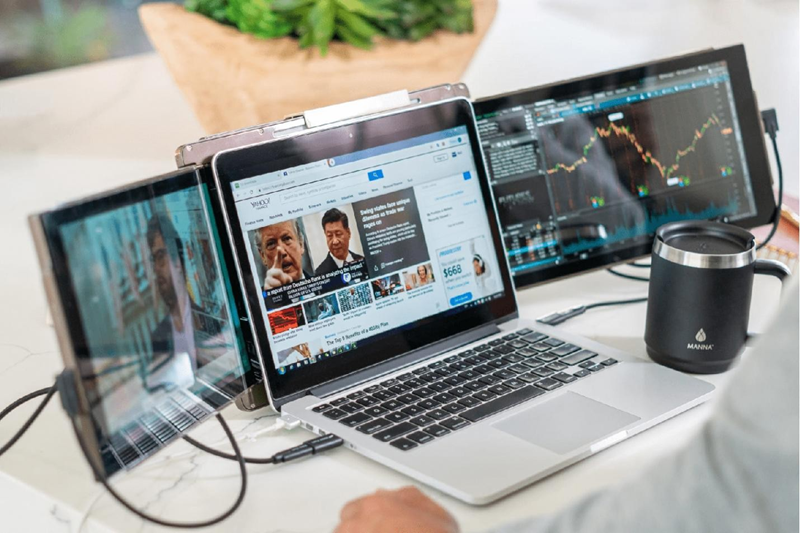
From Hotel Desk to Home Office: How Portable Monitors Bridge the Gap
Working from your hotel room after a day of traveling only sounds more pleasing than it feels. Once you take out the laptop and start working in the small, limited space, with a screen that can only show you one window at a time, it can make the usual setup feel very different from a comfortable home office.
Many travelers use simple tools to make temporary workspaces easier to manage. The Mobile Pixels Trio laptop screen extender is one example. Adding a second screen can help recreate some of the comfort and flexibility people enjoy when working from home.
What a Typical Hotel Desk Looks Like
For seasoned remote workers the difference between a hotel workspace and a home office is quite obvious. The desks are smaller, the setup is less organized, and the daily tasks are taking longer than usual
Limited Space Creates Small Frustrations
Most hotel desks are built for short stays rather than full workdays. There is usually enough room for a laptop, but not much else. Notebooks, documents, and chargers quickly compete for the same space.
Constant Tab Switching Slows Things Down
A single screen can feel crowded when several tasks need attention. A video call may cover project notes, while emails disappear behind another window. Finding information often means moving between tabs throughout the day.
This is one reason many travelers turn to a laptop screen extender when working away from home.
The Difference a Second Screen Makes
The biggest change is not the extra screen itself. It is the way everyday work starts to feel more familiar and less cramped.
More Room for Everyday Tasks
A second screen allows you to create a separate space where you can leave open the work that needs to happen. For instance, you can keep meetings open on one display while notes and sheets can stay visible on the other. In short, research, emails, and project files become easier to access without constantly rearranging windows.
A Setup That Feels More Familiar
Many people build routines around their home office setup. When traveling, those routines can disappear overnight. A portable monitor helps recreate some of that familiar workspace, making it easier to settle into the day.
A laptop screen extender can also help keep calendars, messages, and project files visible without cluttering the main screen.

Portable Monitors Fit the Travel Lifestyle
Remote work rarely happens in the same location every day. One week may involve hotel rooms, while the next includes airport lounges or shared workspaces.
Easy to Pack
Unlike a traditional monitor, portable displays are designed for mobility. Many fit into the same bag as a laptop and add very little extra weight.
Quick Setup Anywhere
Once people get to their destination, they usually want to start working right away, without wasting time with setup or arranging equipment. Portable monitors are easy to hook up, and they can turn even a basic desk into a much more functional workspace within a few minutes, sometimes quicker than expected.
Carrying familiar tools also means the quality of the workspace depends less on the location itself.
Bridging the Gap Between Travel and Home
Although a hotel room can never truly replace a home office, with small improvements, you can make this experience much more comfortable. For most travelers, convenience and consistency go hand in hand. Using the same equipment from one destination to the next creates a workspace that feels familiar regardless of location.
A screen extender is one of those simple additions that help narrow the gap between a temporary desk and a more complete work setup.
A Better Travel Workspace Starts With the Right Setup
The difference between a hotel desk and a home office is much smaller than you might think. With the help of the right tools, you can make temporary workspaces feel more comfortable and easier to use. For remote workers who travel often, extra screen space can help create a setup that feels familiar wherever work happens.


